The Tour

A walkthrough of the whole show.

Three ways in: how the work moves through Show Caller (workflows), what Show Caller gives you to work with (operations), and the questions we keep asking ourselves about live production (approach).

Section 1 — Workflows

A lot of rundowns come to Show Caller already in motion.

Here's how the day-one moves look from where you are now.

Workflow 01

Spreadsheets to Show Caller.

There's a reason for it — a spreadsheet is fast, everyone knows how to read one, and the producer can hand the planning around without committing to a system. The trouble starts when the show begins. The spreadsheet doesn't move. The team is on a stale printout. The producer is on a different tab.

Show Caller picks up where the spreadsheet ends. Drop in an Excel file with a dozen tabs — the importer scores them, picks the most rundown-looking one as the default, finds the header row even when it isn't on row 1, and maps your columns to the show. Four clicks and the show is in.

From there, Plan View is the spreadsheet you knew. Drag rows. Tab through cells. Add columns for every department your show needs. Build it with the whole team — every edit syncs to every other device in real time, with full undo, find, and an edit history on every cell. By the time you're done planning, the show isn't a document anymore. It's the show.
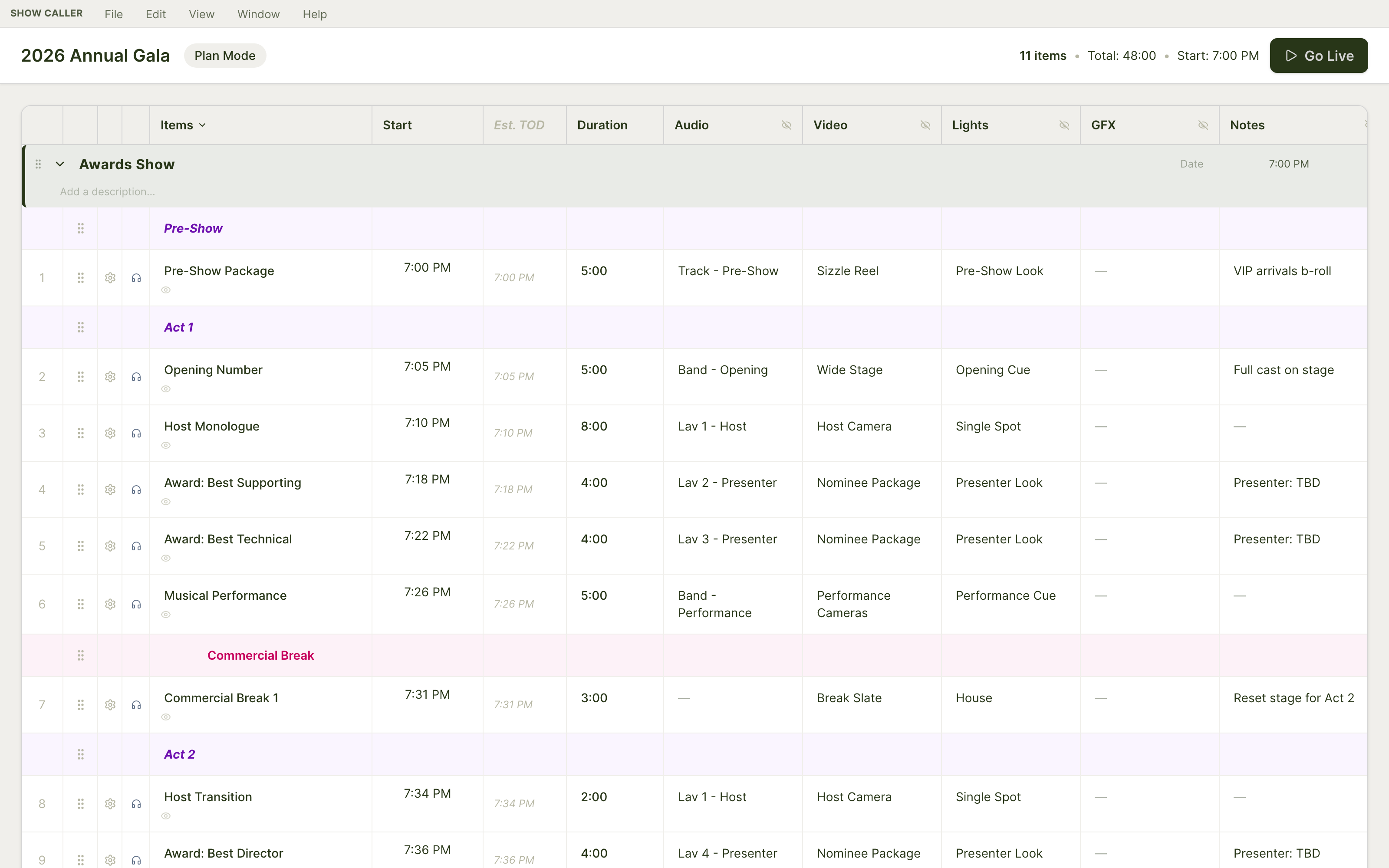
Plan View — the light-themed pre-show editing workspace, showing the 2026 Annual Gala rundown with Audio, Video, Lights, GFX, and Notes columns
Plan View — the spreadsheet you knew, with the whole team on it at once.
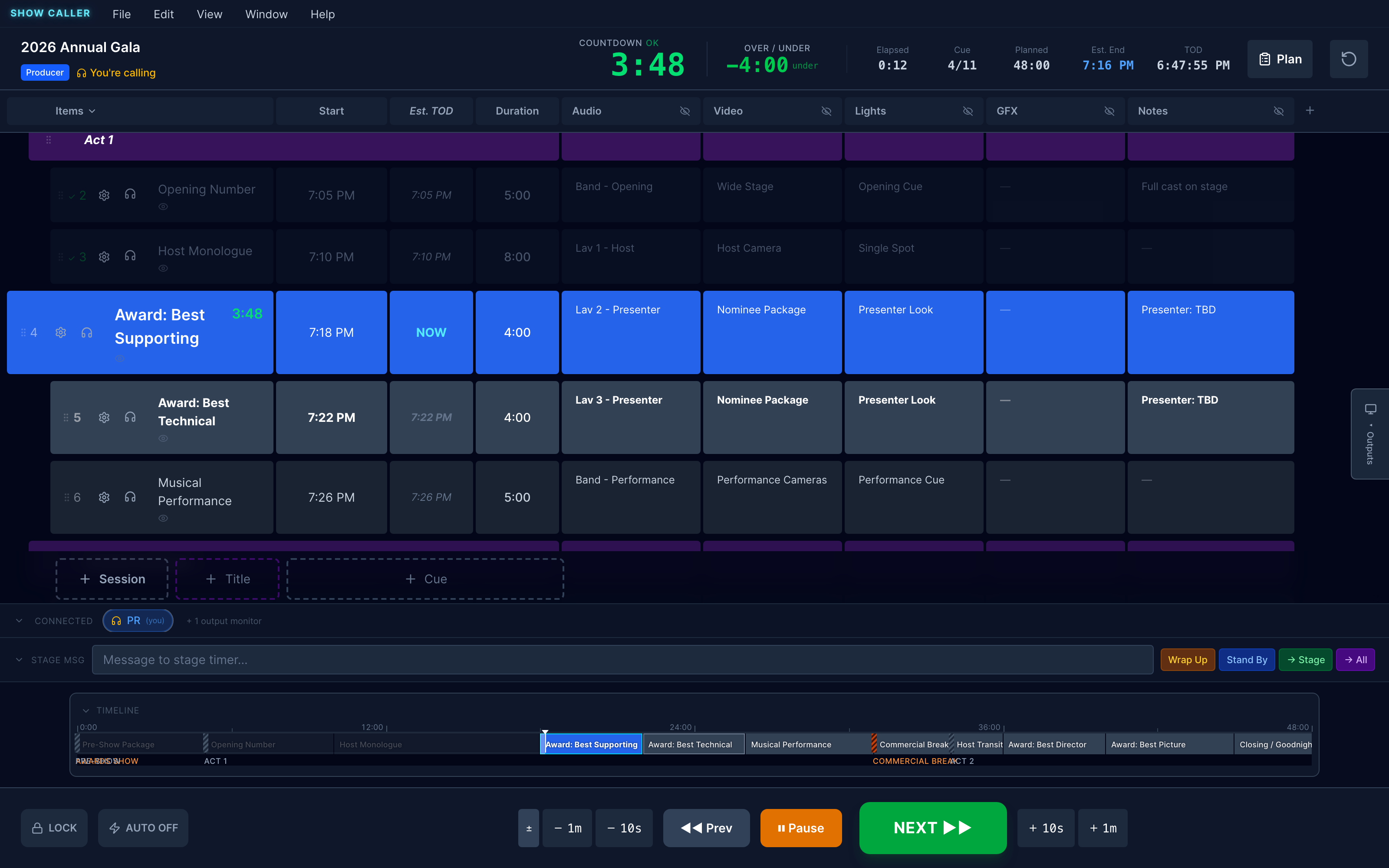
Live View calling a service in real time, with the rundown, timing engine, and transport controls
When the moment runs long, the rundown moves with it.
Workflow 02

From PCO to a team show flow.

Most worship teams have a service plan in Planning Center before Sunday. The truth of the service. Then it gets printed.

The moment that printout leaves the printer, it stops being the truth. The worship leader holds a chorus one more time. The pastor speaks four minutes longer. The kids' video runs short. The paper says one thing, the room is doing another, and the production team is on their own to figure out which.

Show Caller pulls your Planning Center service directly into a live rundown — songs, notes, key, BPM, service start time, all of it. From there it's not paper anymore. The producer can extend a song, cut a transition, push the welcome by ninety seconds, and every operator's view updates in the same breath. Estimated Time of Day recalculates down the rundown. The next cue is always honest about when it's going to land.

PCO plans the service. Show Caller runs it — and lets it breathe when the moment asks for more.

Workflow 03

Leave your stopwatch at home.

The audience took an extra five minutes to get seated. The opener ran sixty seconds long because the band liked the vibe. The keynote still needs a solid twenty minutes to land — twenty-five if the audience laughs in the right places. Catering, breakouts, and childcare are all waiting at the end. Where are we?

Show Caller's timing engine answers that, continuously.

Every cue has a duration. The countdown runs server-authoritative at 500ms ticks, interpolated to 60fps on every device. As each cue completes, Over/Under tells you exactly how far ahead or behind plan you are. Estimated Time of Day projects when every remaining cue will land, recalculating the moment anything changes. Add ninety seconds to a song? The whole downstream picture updates. The producer sees the real landing time of the whole show, all the time.

  • +1 / −1 minute buttons — add or shave time from the running countdown.
  • Reorder cues in flight — everything downstream re-times.
  • Cut a cue to give a long moment its room.
  • Time of Day triggers for hard outs — broadcast joins, satellite windows, the doors-close moment.
  • Per-cue thresholds for the warnings — a 10-minute song doesn't want the same amber-band as a 30-second sponsor slate.

The stopwatch on your lanyard is doing one number. Show Caller is doing fifty, in real time, for the whole show. Leave it at home.
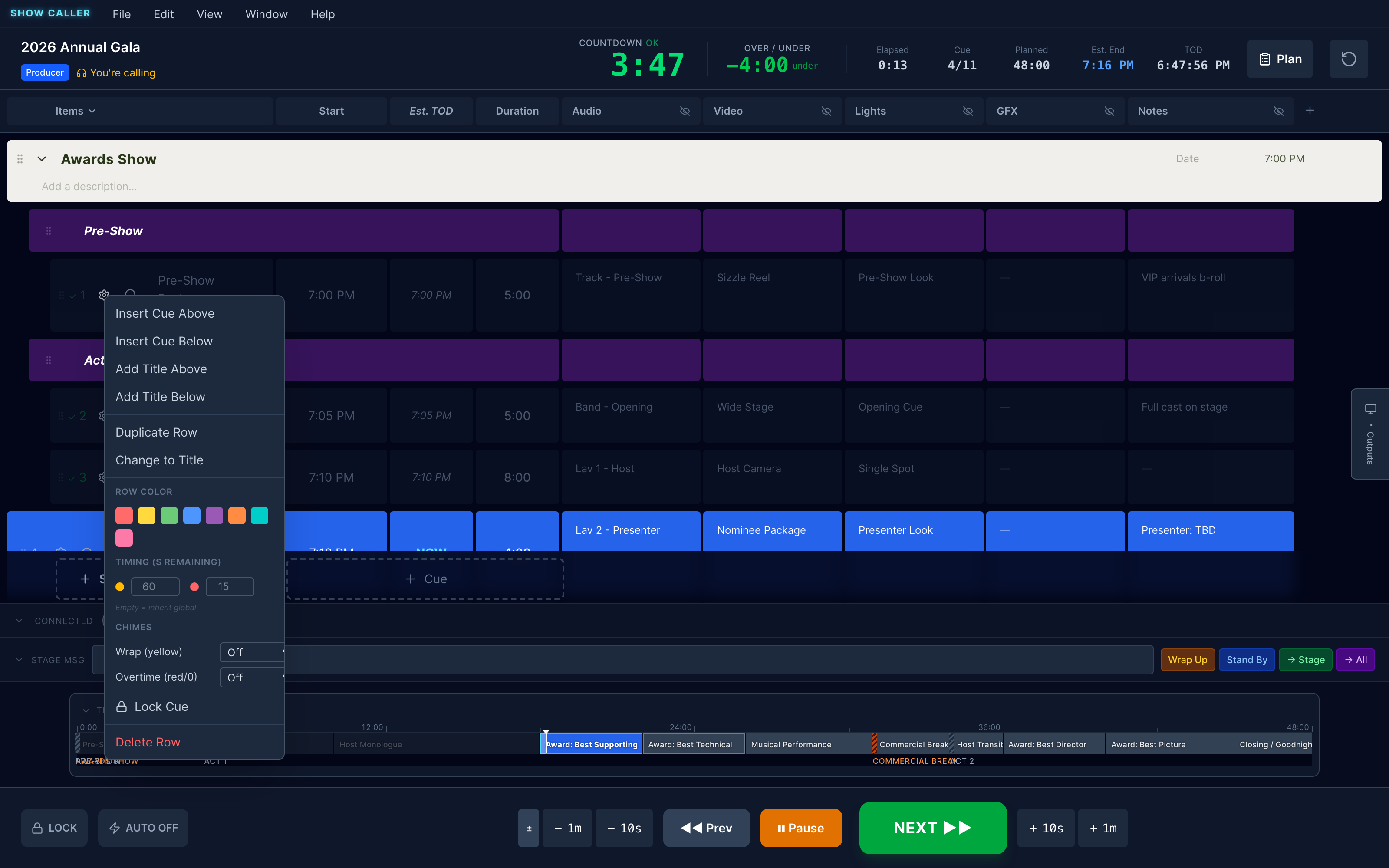
Live View showing the COUNTDOWN, OVER/UNDER, Elapsed, Cue, Planned, Est. End, and TOD — the full timing dashboard during a running show
Five timing numbers, recalculating every tick.
Cue setup popup with row color, chimes, timing thresholds, and trigger options including the ProPresenter mapping
Each cue can map to a ProPresenter playlist item.
Workflow 04

A unified approach to Show Caller and ProPresenter if you've got to run both.

ProPresenter is already in the room. Lyrics, scripture, lower thirds, the stage display the talent reads from. Show Caller doesn't try to replace any of that.

Instead, Show Caller becomes the timing master, and ProPresenter runs the slides. Map each cue in your rundown to a ProPresenter playlist item. When the producer fires GO, Show Caller advances the cue and triggers the right slide together — fire-and-forget, never blocks. Arm and disarm the ProPresenter column per cue, so rehearsal calls don't fire live graphics.

When the worship team is leading instead and ProPresenter is the source of truth for what's on screen, flip Show Caller into follow mode. Now Show Caller tracks ProPresenter's active slide in real time and surfaces it across the team. One button gives control back when you want to drive again.

And when the producer is also the ProPresenter operator — which happens more often than the rest of the industry acknowledges — that's where this lands. One keyboard, one show, both systems. Triggers fire from inside the rundown, follow-mode keeps the teams in sync. No more hopping between two apps to remember where you are.

Workflow 05

Presenter, Backstage and Public displays keep everyone on schedule.

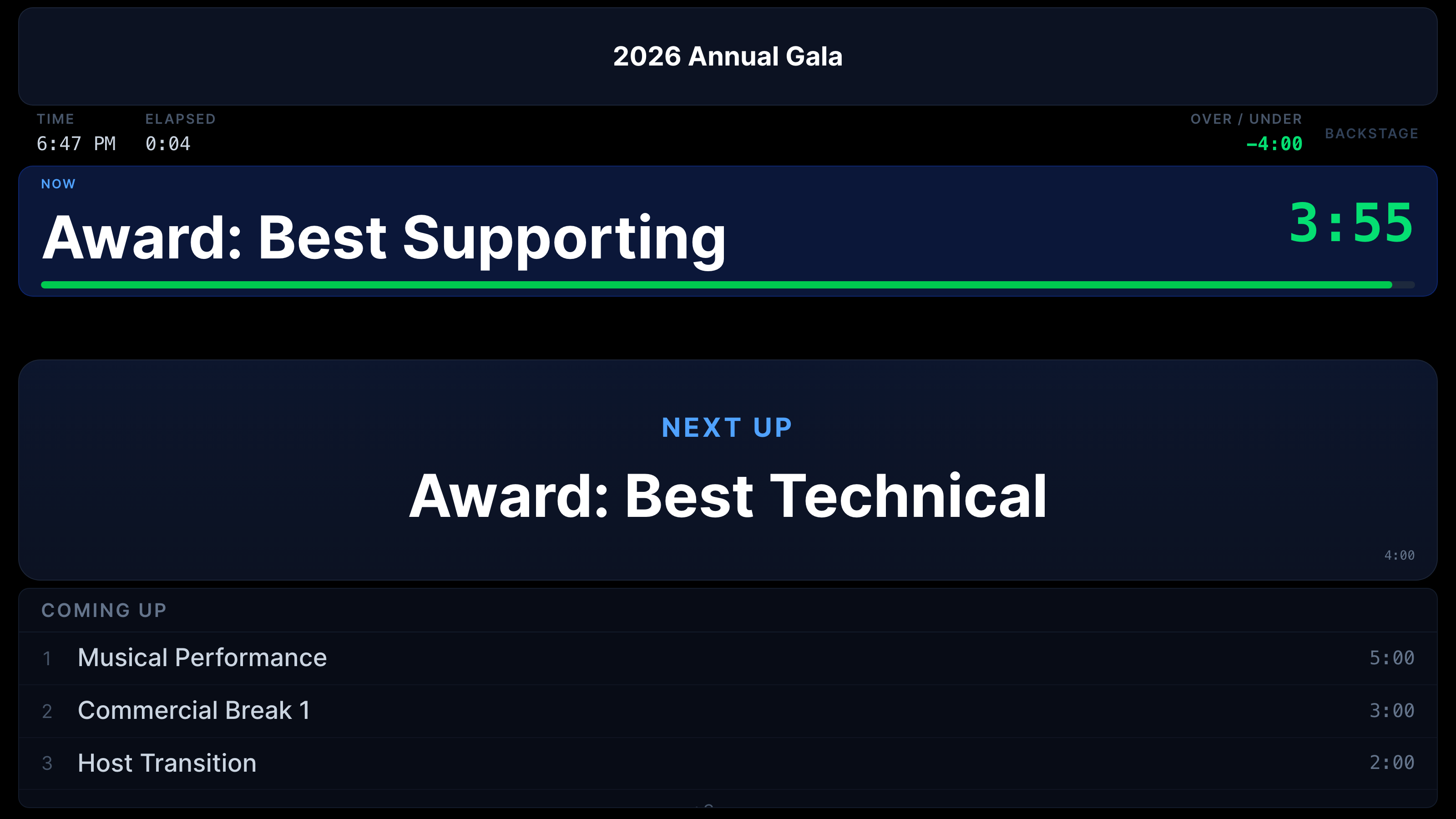
Production information should be at every station that needs it. Operators, stage managers, green room talent, foyer staff, mobile crew. Not on a paper rundown someone needs to find. On a screen, lit up, telling them what's now and what's next.

Show Caller outputs HDMI, NDI, and Blackmagic DeckLink — up to eight configurable outputs per machine. Patch the Stage Timer into your switcher as a video source. NDI a Backstage Display onto the dressing-room monitor over the network. Send a Producer TX to the truck. The video engineering is done.

Each display does a different job:

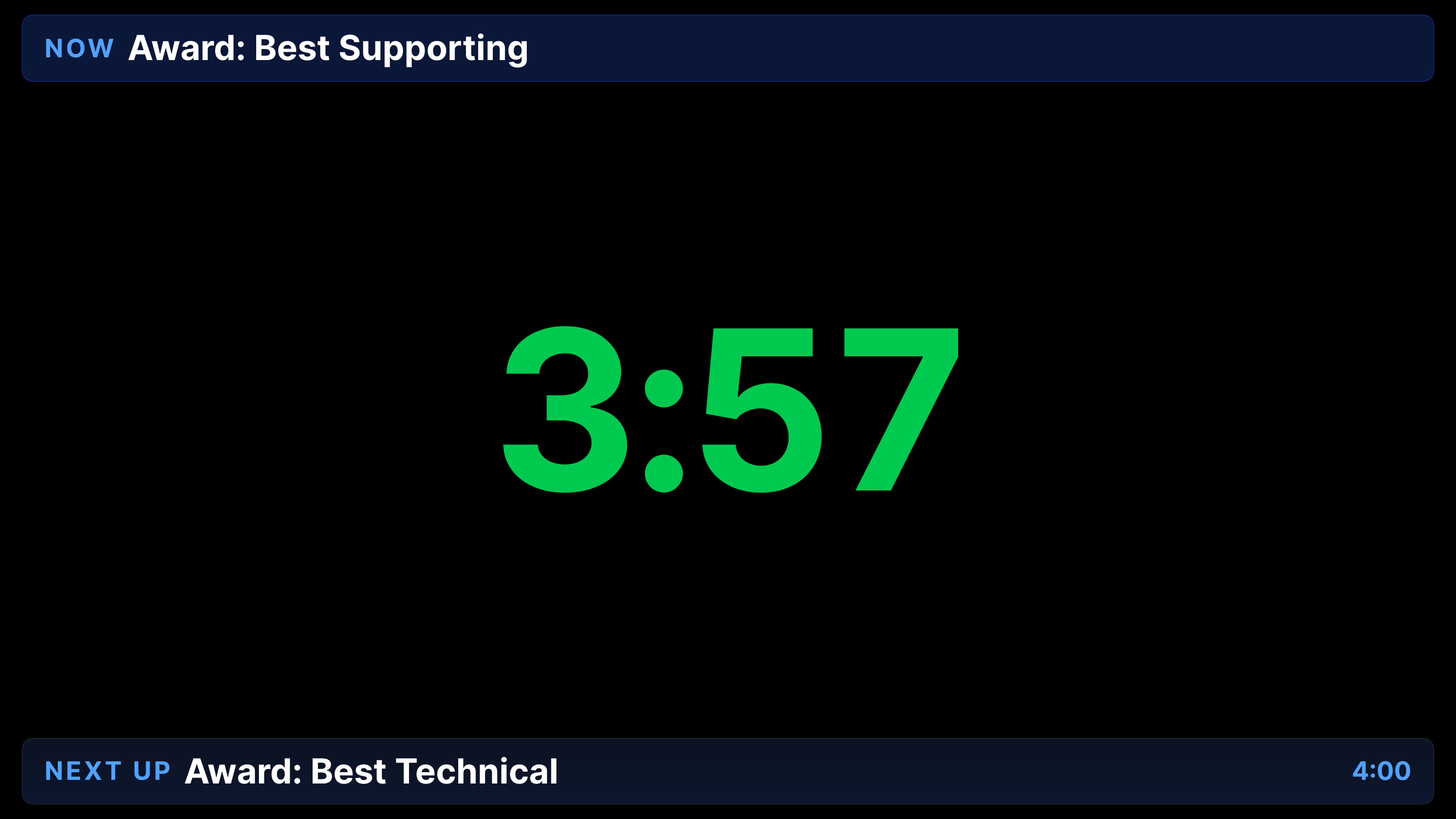
  • Stage Timer — for the talent. Big TED-style countdown, NOW and NEXT cards, color walking green → amber → red.
  • Backstage Display — for the green room and crew bays. Current cue with progress, next up, coming-up list, the show clock.
  • Public Display — for foyers, lobbies, lobby slates. Audience-appropriate. No operator detail.
  • Producer TX — compact reference for broadcast monitors.
  • Mobile Cue View — for the floor manager walking the building.

Portrait mode rotates 90° in software, so you can lay a TV on its side without a scaler or a third-party box. Per-output Stage Scale and Text Brightness dial the look to the room without changing accent colors.

It's a visual conductor. Operators and talent see the same beat, in the form that's right for each of them.
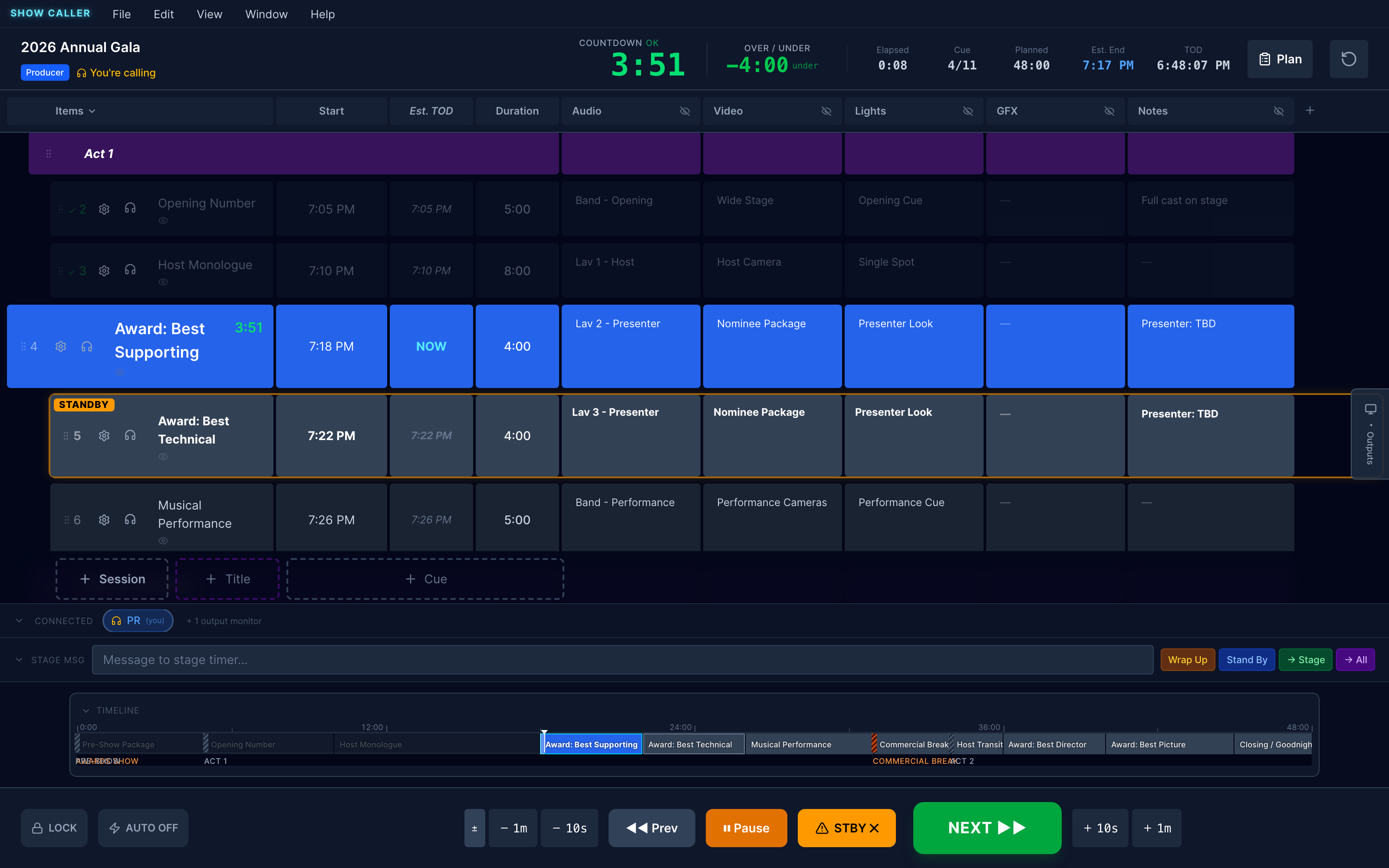
Live View with Silent Standby active — amber STANDBY ring around the next cue, STBY button in the transport bar
Amber ring + dept-column glow. Operators tap to acknowledge.
Workflow 06

Standby, silent.

Sometimes the show calls for a game-day move. Cut a slate. Stack the next two songs. Skip the bumper because the speaker wrapped early. Normally that means the producer keys the comm and talks the operators through it — over the opener, on top of the worship leader's prayer, in the middle of a take.

With Silent Standby, the producer doesn't have to say it. Select the cue you're moving to. Hit READY. That cue lights up with an amber ring in Live View, and every operator's assigned column on that row lights up too. Each operator taps once to acknowledge — their cell turns green with their initials. The producer sees, at a glance, who's ready and who isn't. No one keyed a mic.

It's a silent symphony. The producer gets the confidence to reshape a session in real time, knowing the team is moving with them, without ever raising their voice.

Workflow 07

Stage Management, on the rundown.

The bigger the show, the more its rhythm runs on who's actually ready. Did the keynote get miced? Is the band on deck? Did the next presenter walk in yet? Most production rooms answer these by yelling over comms during the moment when comms should be quiet.

Show Caller adds a fourth role for this work: Stage Manager. PIN-gated, peer to Producer, Operator, and Viewer. The SM works inside Live View — the same place the rest of the team works — through a dedicated panel that lists upcoming cues with their presenters.

The presenter column itself is structural — it sits on every cue, always there, after the title and before the operator columns. When the Producer writes the rundown, they drop a presenter (or three, or eight) into each cue: just a name, typed in. The SM panel reads that list and gives the SM two tap targets per presenter:

  • 🎤 miced — the mic is clipped on. Tap to confirm.
  • ▶ on deck — they're in the wings, ready to step.

The Producer reads those flags from across the room. They never set them — that's the SM's job, because the SM is the one who actually sees the mic clip on. Not assumed-ready. Actually ready. The Producer hits GO knowing the answer.

Big show? Bring assistant SMs. Multiple SM clients work concurrently — the server's the authority, last-write-wins, no locking.

"Not miced" is a perfectly valid end state. Panels often have shared house mics. The plan for who-gets-what lives in the audio column. The presenter chip reflects what physically happened. The system never warns or color-codes a chip as "incomplete." That's not the SM's job either.

It's the same idea as Silent Standby, applied to people instead of cues: the Producer gets the information they need, without anyone keying a mic.
Live View — the surface where the SM panel rides alongside the rundown, surfacing upcoming cues and their presenter slots
Live View — where the SM panel rides alongside the rundown.
Section 2 — Operations

Show Caller brings show management into the digital age. It's more than stage timers, or rundown synchronicity.

Once you're in, here's the operational ground.

A

Sessions, Titles, Cues

Organize the show the way a production thinks about it. Sessions are top-level containers — Awards Ceremony, Sunday First Service, Conference Day 1. Titles are non-cue dividers within a session — Pre-Show, Act One, Worship Set, Q&A. Cues are the actual moments the show fires — timed, playable, with content across every department column.

Three levels of grouping. One source of truth.

Plan View showing Sessions, Title rows (Pre-Show, Act 1), and Cues with department columns
B

Modify cues in real time

Add a minute, shave a minute, reorder a cue, change its duration, swap two rows, mark one off — every change broadcasts to every connected device and every output display the same instant. EST TOD recalculates downstream.

There is no "save" to remember. There is no "they're on the old version." The truth is the screen.

Live View with a cue running, OVER/UNDER and EST TOD recalculating continuously as the rundown changes
C

Customize every cue

The cue is the unit. So the cue is what you customize.

  • Stage timer thresholds — push amber and red later on the long ones, sooner on the tight ones.
  • Chimes — fire a configurable audio chime at wrap and overtime, out of the producer laptop or the server.
  • Tags — visual identity per cue (House Music, Sponsor Slate, Hard Out — your library, your colors).
  • Row color, lock, custom notes — small things that make a big show readable.

Big show or small, every cue ends up doing exactly what you need it to do.

Cue setup popup with row color, per-cue timing thresholds, chimes, lock, trigger, and delete options
D

Brand the room from a URL

Paste a client's website into the brand extraction tool. Show Caller pulls their colors and fonts and applies them to the public-facing displays. Six visual treatments to choose how the brand sits on the surface. A surface opacity slider to tune the look to the venue.

It's the kind of small extra that makes a client feel known.

Backstage Display — the surface that picks up client logos, colors, and treatment after brand extraction
E

Roll out displays for every audience

One Mac. Up to eight outputs. Stage timers in talent's eyeline. Backstage displays in green rooms and crew bays. Foyer screens for staff and arriving guests. Mobile cue view in the floor manager's pocket. Portrait or landscape. HDMI, NDI, or Blackmagic DeckLink.

The video engineering is done. You get the production information everywhere it needs to be.

Stage Timer output running TED-style with NOW card, big green countdown, and NEXT UP card
F

Collaboration on every column

Every department gets a column — Audio, Video, Lights, Graphics, Camera, Comms, anything you can name. Each operator works in their own column without stepping on the others. Each user saves their own column layout, so the TD's view and the FOH engineer's view stay distinct.

When the show adapts, the rundown adapts in front of everyone at once. Show Caller becomes the production team's source of truth — even as the show is moving.

Live View with department columns visible across each cue — each operator working in their own column without stepping on the others
G

Stage Management on the rundown

Production has a fourth role: Stage Manager. A presenter column on every cue lists who's on stage. The SM taps two flags per presenter — miced and on deck — from a dedicated panel inside Live View. The Producer reads physical readiness across the room without anyone keying a mic.

Same idea as Silent Standby, applied to people.

Section 3 — Our Approach

How did we get here?

Tap any question to read the answer we're building toward.

How do we use digital tools to make a static rundown dynamic?

A spreadsheet is static because it doesn't know what time it is, who's connected, or what just happened.

Show Caller gives the rundown those three things — a server-authoritative clock that every device syncs to, a real-time channel that broadcasts every edit to every connected operator in the same breath, and a complete model of what's been fired, what's running, what's next. The result isn't a rundown that's "interactive." It's a rundown that knows where the show is.

Once the rundown knows where the show is, it stops being a document. It becomes part of the production.

How do we synchronize a production team without yelling over comms during the opener?

The display is the standby.

When the producer makes a call, it appears on every operator's screen, the backstage monitor, and the talent's stage timer in the same breath. Standby is silent — and acknowledged silently. Cue changes appear in every department's column simultaneously. The only things left for comms are the human ones: the cue confidence call, the safety word, the heads-up between humans who trust each other.

Show Caller carries the rest. The opener stops sounding like air-traffic control. It starts sounding like a show.

How do we bring more calm to a production?

Calm comes from trust.

Trust that the rundown is true. Trust that the team can see the same picture. Trust that when something changes, it changes everywhere, instantly. Trust that the timing is honest, even when it's bad news.

We obsessed over the seconds because we know what a producer's nervous system does when the seconds aren't trustworthy. When the system is trustworthy, the producer can stop managing the system and start conducting the show. That's where calm lives.

How do we give operators and talent what they need — without overwhelming either with data they can't use?

One show, many lenses.

The TD sees the whole rundown with every department column. The lighting operator sees the rundown with the lighting column emphasized and the rest dimmed. The talent on stage sees a giant green countdown and the name of what's next — and nothing else. The audience-facing screen shows the audience-appropriate cut.

Same show, different surface, each pruned to its job. We refused the temptation to show everyone everything. We refuse it still.

How do we keep the trains on time, while slowing some moments down for the responses that land even better than we imagined?

Trains run on time when the conductor knows two things — where they are right now, and where they need to be next.

Show Caller answers both, continuously. EST TOD recalculates the moment any cue shifts. Over/Under tells the producer how much time is recoverable, and where. So when a worship moment runs three minutes long, the producer doesn't have to choose between honoring the moment and protecting the show. They can see, in real time, which downstream cues can absorb the extra — and shape the rest of the show to make space.

The math becomes invisible. The moment gets its room.

How do we engage the whole team to flow with the moment, with the careful precision of an orchestra, under the watchful eye and emotional direction of the show caller?

An orchestra moves as one because every player is reading the same sheet, hearing the same downbeat, watching the same conductor.

Show Caller is that sheet — every department has it, every screen is the same picture, every change ripples through the whole ensemble at once. The producer is the conductor. The cues are the downbeats. The team's attention is freed from comparing notes and reserved for what they actually do — making the show.

When that alignment locks in, the show stops feeling like coordination and starts feeling like performance. That's what we're building toward.

Take it to a real show

Ready to call your next show?

Full-featured 14-day trial. No credit card. Take it to a real show and feel the difference.